
Applies to: Linux and WordPress hosting customers
Our Linux hosting runs a modern PHP (currently the 8.x series). Most sites never need to touch PHP settings, but here's what you can see and change per domain in Virtualmin — and when to ask us instead.
Viewing your PHP settings
- Log into Virtualmin (see How to log into Virtualmin).
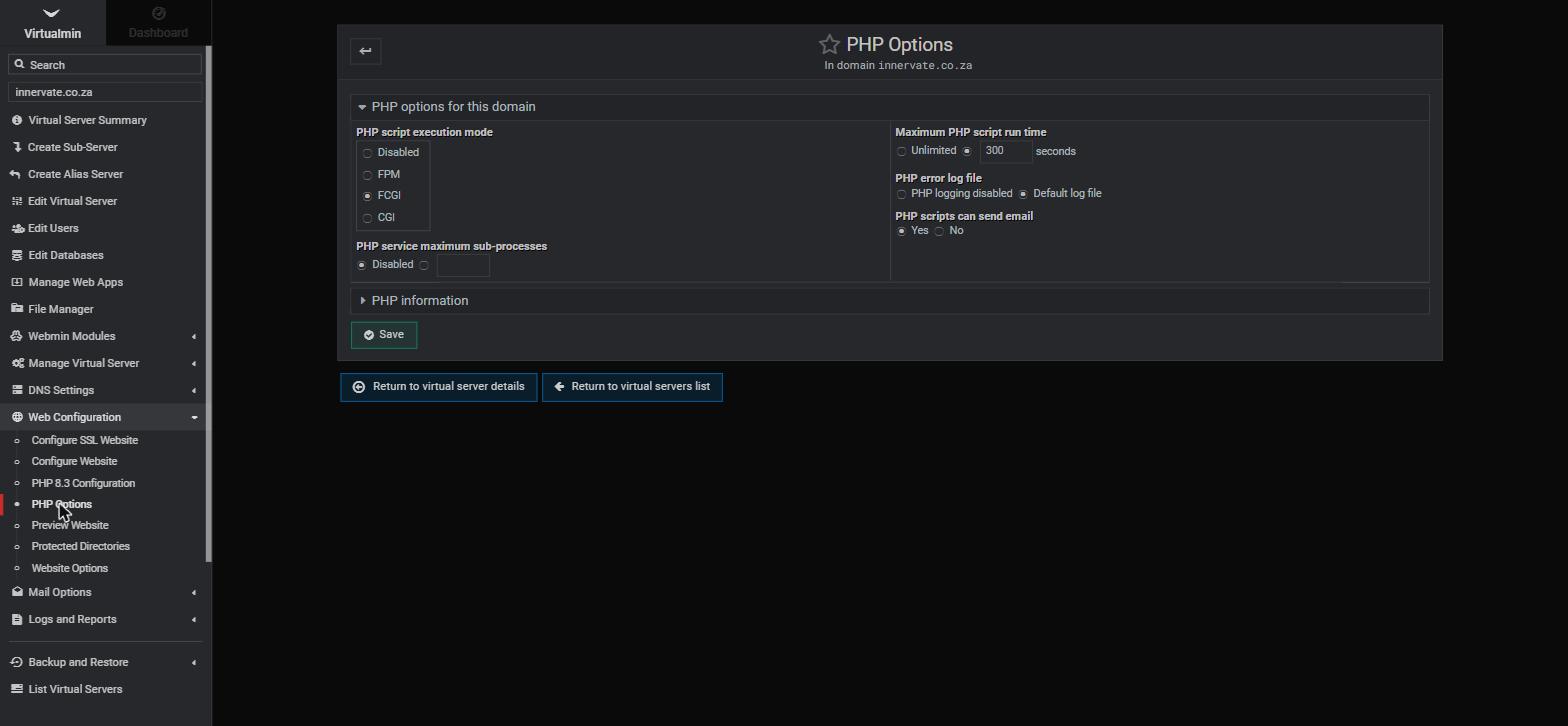
- In the left sidebar, expand Web Configuration. You'll see a PHP Configuration item showing the active version (e.g. PHP 8.3 Configuration), plus PHP Options.
- PHP Options shows the execution mode (FCGI is the default) and the maximum script run time; PHP Configuration exposes common limits like memory, upload size and execution time for your domain.
Common tweaks
- Bigger uploads: if WordPress complains a file "exceeds the maximum upload size", raise
upload_max_filesizeandpost_max_sizein PHP Configuration. - Memory errors: "Allowed memory size exhausted" means
memory_limitneeds a bump. - Slow scripts timing out: the maximum run time in PHP Options can be raised for long imports.
Change one thing at a time and retest — huge limits are rarely the real fix and can mask an underlying problem.
PHP versions
The PHP version available on the server is managed by us to keep it secure and supported. If your application needs a specific PHP version — an older app that isn't 8.x-ready, or a new one wanting the very latest — open a support ticket and we'll advise on options. As a rule, keeping your site's code current is far safer than pinning an old PHP.
Related articles
How to log into Virtualmin • How to install WordPress