
Applies to: domains registered through Webtech
Every domain has registered contact details (often called WHOIS details) held at the registry: the registrant (owner), plus administrative, technical and billing contacts. Keeping these up to date matters — the registrant details determine who legally controls the domain, and transfer approvals and renewal notices are sent to these addresses.
Updating your contact details
- Log into your client area at https://my.webtech.co.za.
- Go to Domains > My Domains and click the row of the domain.
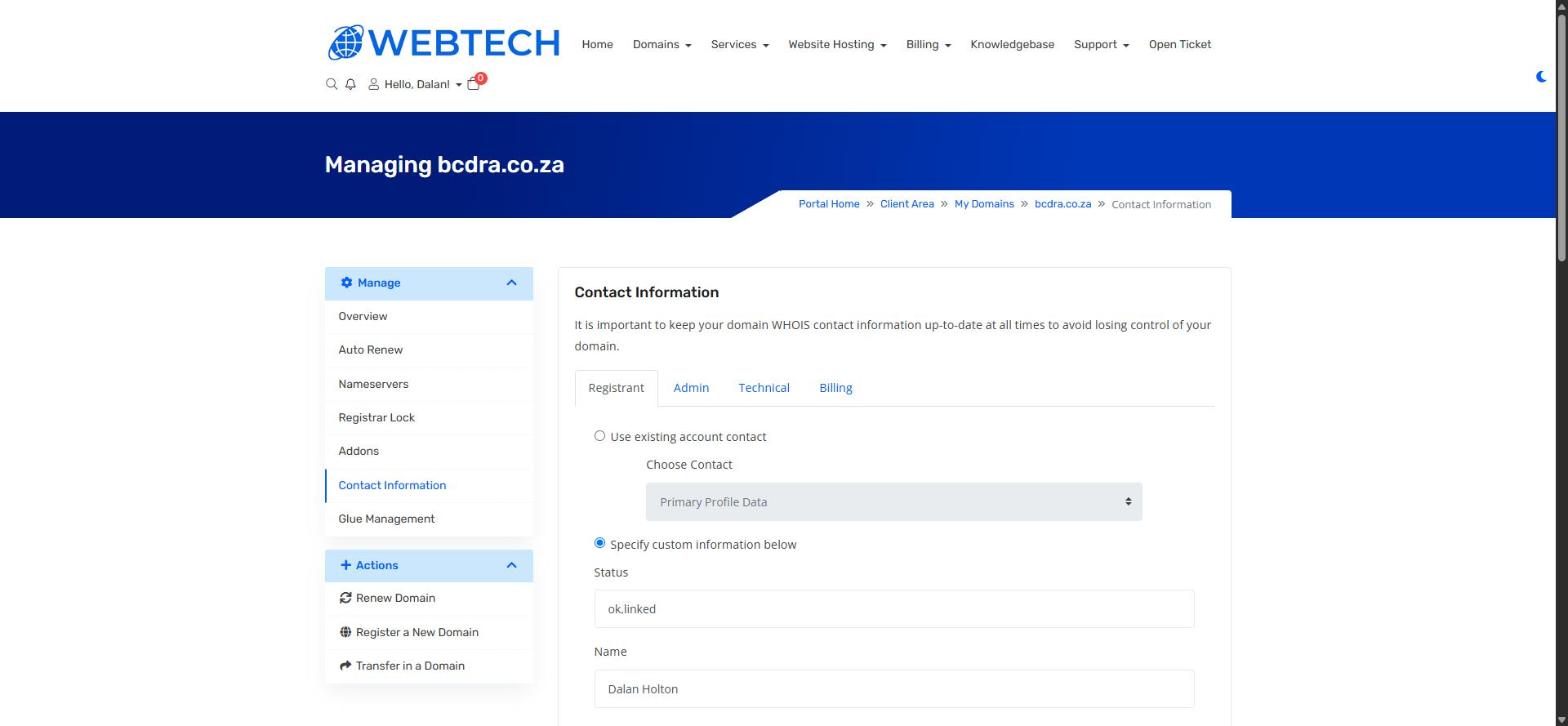
- In the left sidebar, click Contact Information.
- Work through the four tabs — Registrant, Admin, Technical and Billing. For each one you can either:
- Use existing account contact — pick your main profile or a saved contact from the dropdown, or
- Specify custom information below — type the details in manually.
- Click Save Changes at the bottom of the page.
Bulk option: to update contact details on several domains at once, go to Domains > My Domains, tick the domains, and click Edit Contact Information in the toolbar above the list.
Important to know
The Registrant is the legal owner of the domain. If your business is restructuring, changing name, or the domain should belong to a different entity, update the registrant details — and if you're unsure of the implications, ask us first. For some domain extensions a registrant change is treated as a formal owner transfer by the registry.
Keep the email addresses on these contacts working and monitored. Domain transfer requests and expiry warnings go to them, and a stale address can mean losing a domain — or not being able to approve a transfer when you need to.
Related articles
How to renew your domain • How to transfer your domain away (registrar lock and EPP)