
Applies to: all Webtech customers with a domain registered through Webtech
Auto Renew takes the risk out of forgetting a domain renewal. When it's enabled, we automatically generate a renewal invoice for you before your domain's due date — all you have to do is pay it. When it's disabled, no renewal invoice is created and the domain will expire unless you renew it manually.
Changing the Auto Renew setting
- Log into your client area at https://my.webtech.co.za.
- Go to Domains > My Domains and click on the row of the domain you want to change (click anywhere in the row except the domain name itself, which opens your website).
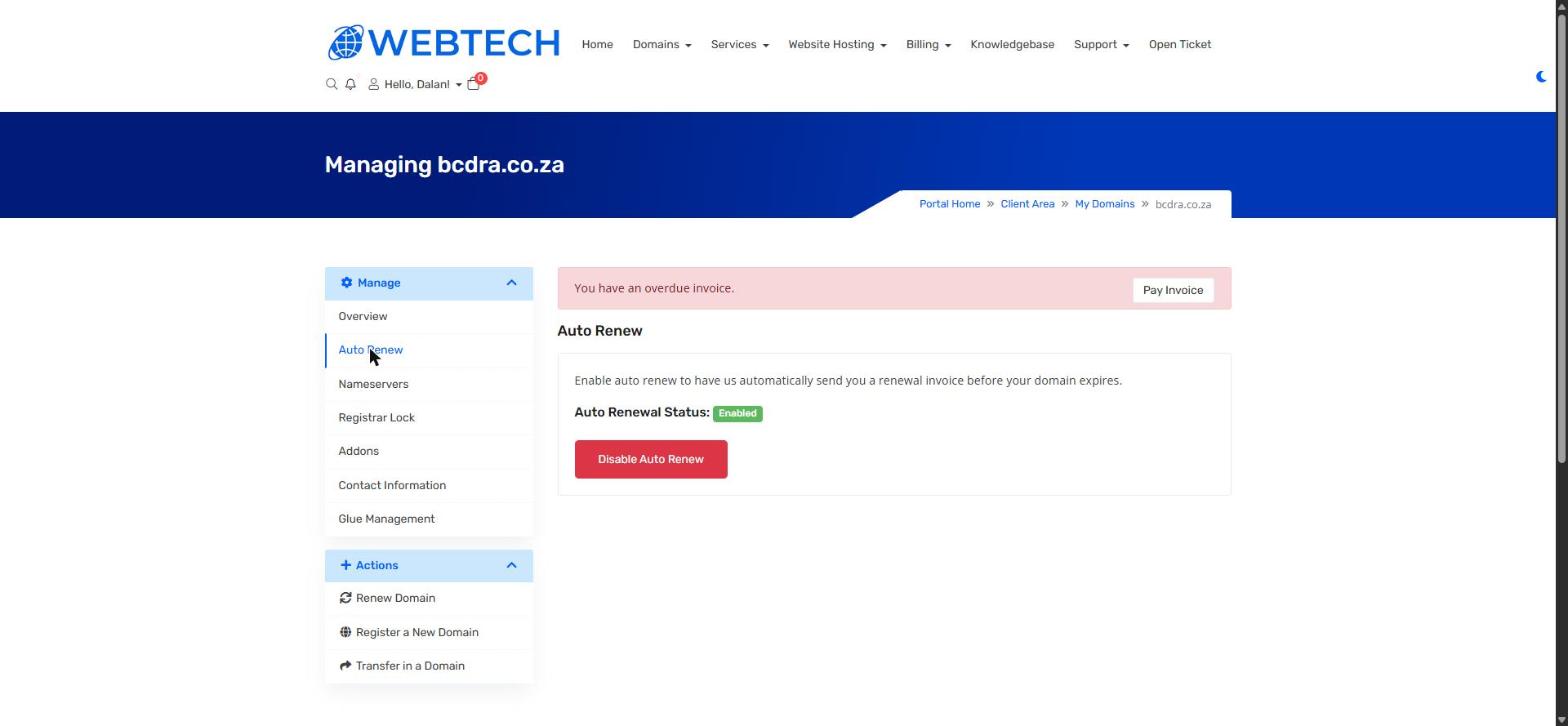
- In the left sidebar under Manage, click Auto Renew.
- The page shows your current Auto Renewal Status. Click Disable Auto Renew to turn it off, or Enable Auto Renew to turn it back on.
Important to know
Auto Renew generates the invoice automatically — it does not take payment automatically. Your domain is only renewed once the invoice is paid, so keep an eye on your email (and the Billing > My Invoices page) as your renewal date approaches.
Only disable Auto Renew if you genuinely intend to let the domain lapse. A lapsed domain takes your website and email down with it, and once released by the registry it can be registered by anyone.
Related articles
How to renew your domain • How to view and pay an invoice