
Applies to: domains registered through Webtech
Nameservers decide who answers DNS queries for your domain. By default your domain uses Webtech's nameservers, which is what lets you manage records from your client area and what our hosting expects. You'd typically only change nameservers if you're moving DNS to a third-party service (like Cloudflare) or to another host.
Changing your nameservers
- Log into your client area at https://my.webtech.co.za.
- Go to Domains > My Domains and click the row of the domain.
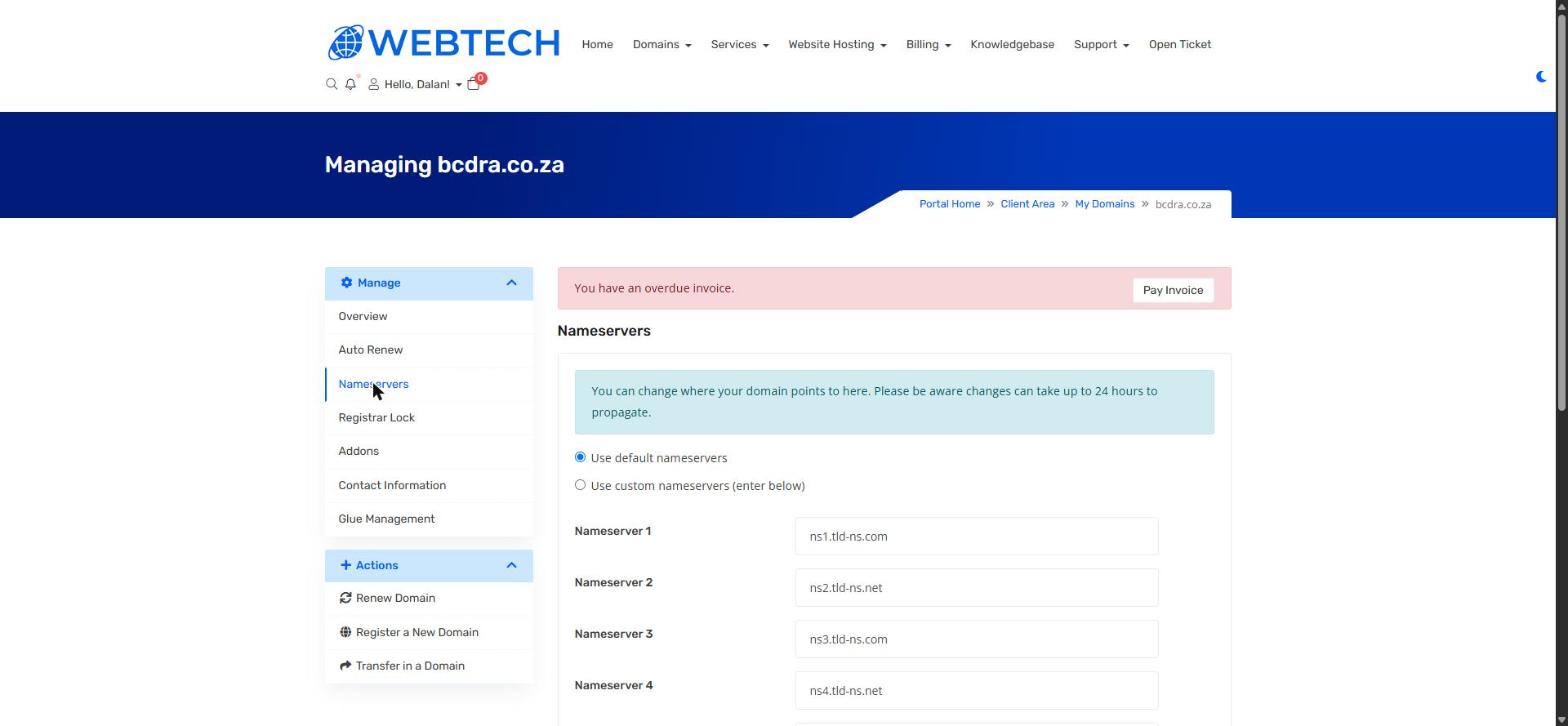
- In the left sidebar, click Nameservers.
- Choose one of the two options:
- Use default nameservers — recommended for anyone hosting with Webtech. This points the domain at our nameservers (ns1–ns4.tld-ns.com/.net).
- Use custom nameservers (enter below) — enter at least two nameservers from your external DNS provider in the Nameserver 1–4 fields.
- Click Change Nameservers to save.
Important to know
Nameserver changes can take up to 24 hours to propagate. While propagation is underway, some visitors may still be served by the old nameservers.
Switching to custom nameservers moves all DNS control to the new provider — the DNS Management editor in your client area will no longer have any effect, and you'll need to recreate your website and mail records at the new provider before switching, or your site and email will go down.
If you're changing nameservers as part of moving to Webtech from another host, do it the other way round: get your hosting set up with us first, then point the nameservers at us.
Related articles
How to manage your DNS records • How to transfer your domain to Webtech