
Applies to: Windows hosting customers
Two of the most useful mailbox features live on the same SolidCP page: forwarding (send incoming mail on to another address) and the autoresponder (automatic replies, e.g. out-of-office). Here's how to set up both.
Getting to the settings
- Log into SolidCP at https://panel.webtech.co.za.
- Go to Mail > Accounts and click the email address you want to configure.
Setting up forwarding
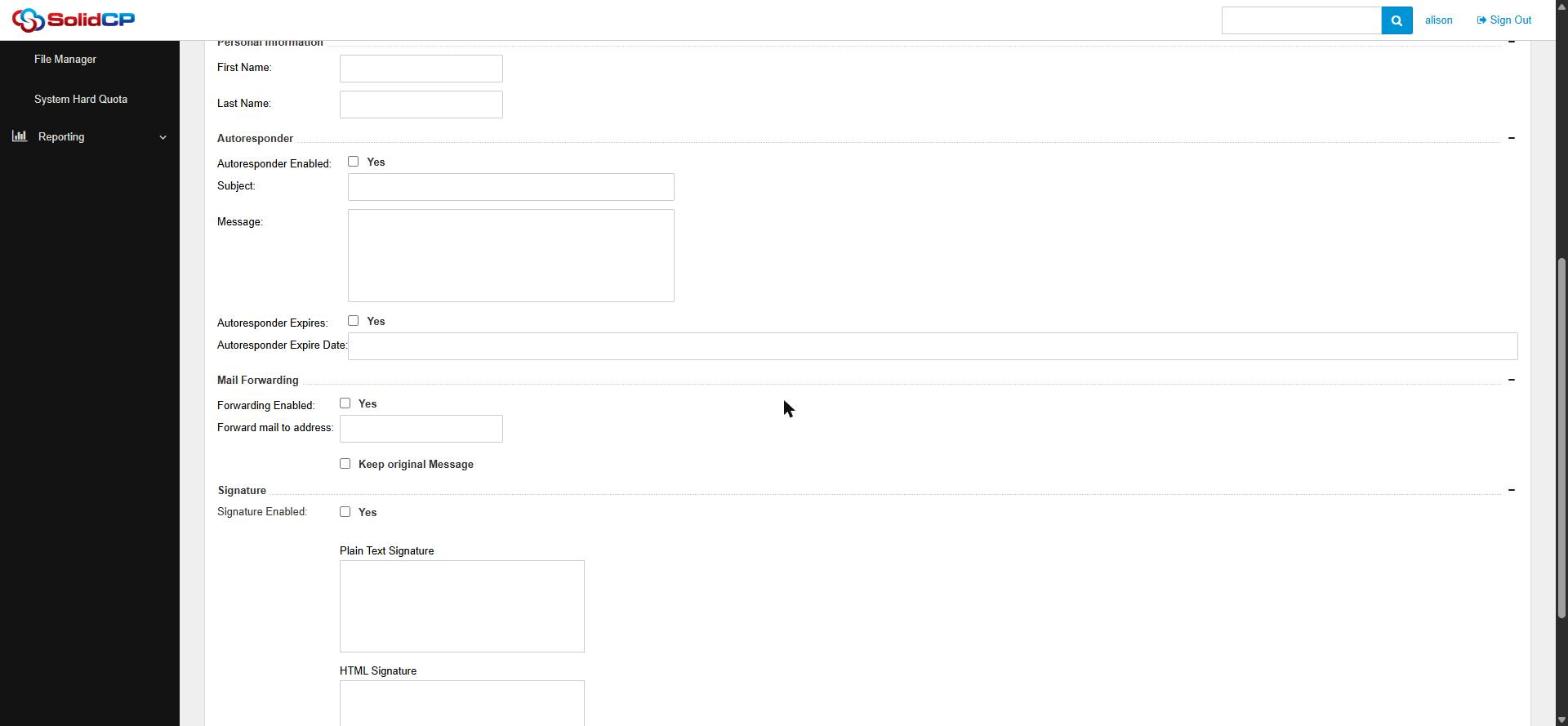
- Scroll to the Mail Forwarding section.
- Tick Forwarding Enabled.
- Enter the destination in Forward mail to address — e.g. your personal Gmail, or a colleague's address.
- Decide on Keep original Message:
- Ticked — a copy stays in this mailbox and a copy is forwarded. Good if you also read this mailbox directly.
- Unticked — mail passes straight through without being stored. Good for pure alias-style forwarding (but nothing is kept here, so there's no backup copy).
- Click Save.
Setting up an autoresponder (out of office)
- On the same page, scroll to the Autoresponder section.
- Tick Autoresponder Enabled.
- Enter a Subject (e.g. "Out of office until 5 January") and your Message — when you're back, who to contact in the meantime, and expected response times.
- Optionally tick Autoresponder Expires and set an Expire Date so it switches itself off automatically when you're back — no more "out of office" replies in February.
- Click Save.
Tips
When forwarding to an external service like Gmail, remember that strict spam filtering there can occasionally reject forwarded messages — if something seems to be going missing, keep the original message enabled so you have a copy, and check this mailbox in Outlook or on your phone.
Keep autoresponder messages professional and light on detail — they go to everyone who emails you, including strangers, so avoid sharing information like exact travel plans.
Related articles
How to add an email account in SolidCP